> For the complete documentation index, see [llms.txt](https://docs.krystal.app/llms.txt). Markdown versions of documentation pages are available by appending `.md` to page URLs; this page is available as [Markdown](https://docs.krystal.app/products/liquidity-management/how-to-find-lping-strategies-and-add-liquidity-on-solana-with-krystal.md).
# How to find LPing strategies and add liquidity on Solana with Krystal
Krystal now supports Solana for LPing strategies, allowing users to efficiently participate in liquidity pools. This guide provides step-by-step instructions on how to check best strategies Solana and add liquidity using Krystal's platform.
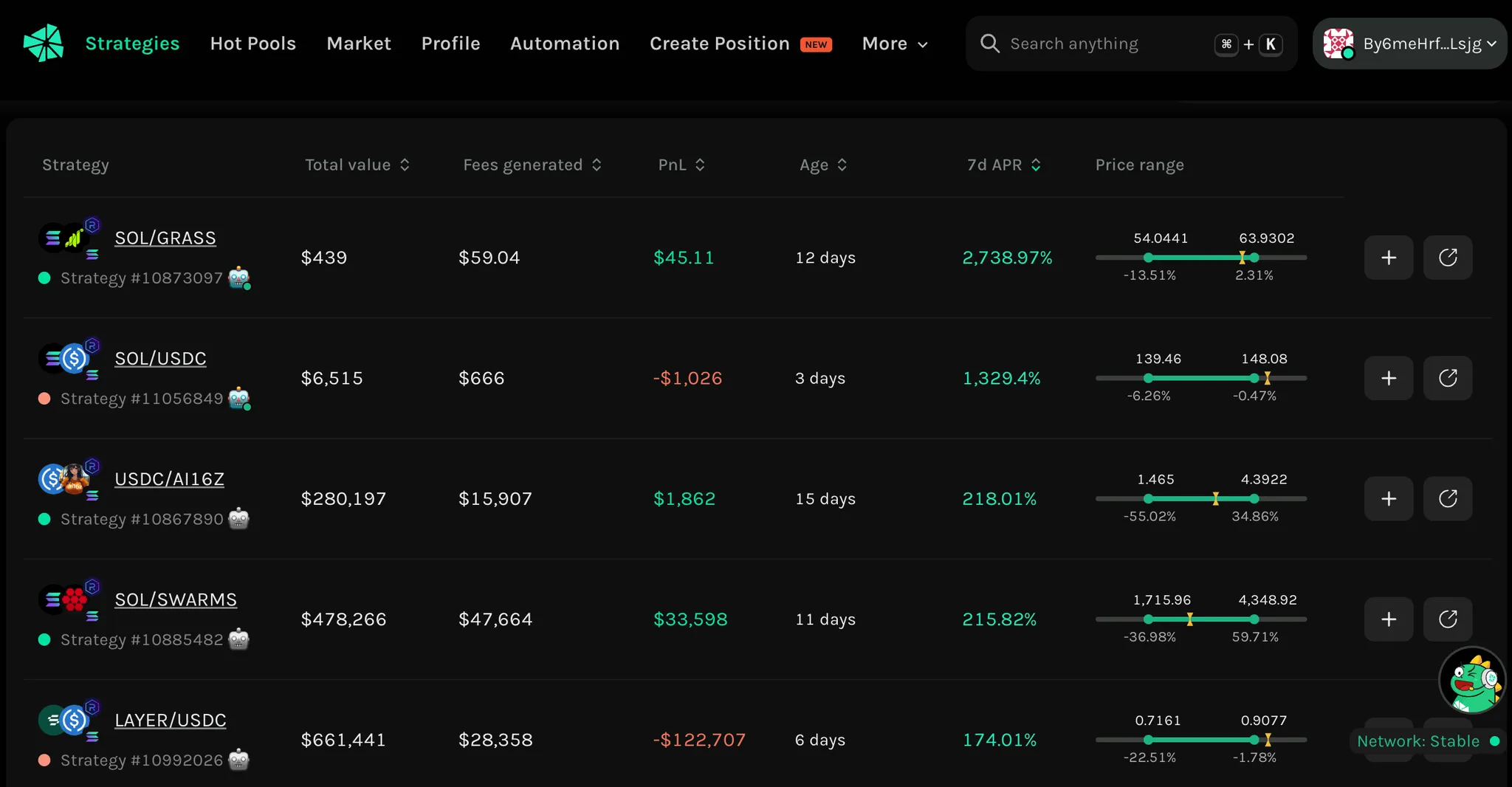
#### Step 1: Navigate to the "Strategies" section and select Solana Network
First, visit the Krystal Dashboard. Locate and click on the "Strategies" section, where all available LPing strategies from users are displayed.
By default, the dashboard may display strategies from multiple blockchain networks. To filter and view only Solana-based strategies, you should click on the "All Networks" logo at the top right of the interface and select Solana from the available blockchain networks.
The dashboard will now display LPing strategies on Solana only.
#### Step 2: Choose your suitable LPing strategy
To help you select the best LPing strategy, Krystal provides multiple metrics and categories. These include Total Value, Fees Generated, PnL, Age, and more.
When choosing a strategy, consider your financial objectives. If you are looking for a long-term stable income, it is advisable to select strategies that have consistently generated high fees and maintained a positive PnL. However, if you prefer a high-risk, high-return approach, focus on strategies with high 7d APR. For those concerned about liquidity sustainability, a strategy with a high TVL and a longer age is ideal.
#### Step 3: Review the details of your selected strategy
After selecting a strategy, click on it to access a detailed breakdown of its key performance aspects.
* **Overview Tab** provides insights into the strategy’s performance over different timeframes, including 24h, 7d, and 30d returns.
* **Positions Tab** offers a historical overview of liquidity positions within the pool, displaying crucial details such as fees generated, PnL over time, and any changes in liquidity allocation.
* **Automation Tab** details how automation features work to maximize returns, allowing users to evaluate the effectiveness of these tools in maintaining profitability.
#### Step 4: Enter the pool with Zap In
Next, proceed to enter the liquidity pool through the **Create Strategy** section.
One of the key benefits of Krystal is the **Zap In** feature, which simplifies the liquidity provision process. Normally, adding liquidity to a pool requires depositing 2 tokens in the correct ratio. However, with Zap In, users can add liquidity using just **one token**, as our system will automatically convert and balance the token to meet the pool's requirements.
To use Zap In, users simply need to enter the amount of the token they want to provide. The platform will then calculate the optimal ratio for liquidity provision, convert the single token into the required pair, and ensure the best execution rate for the transaction.
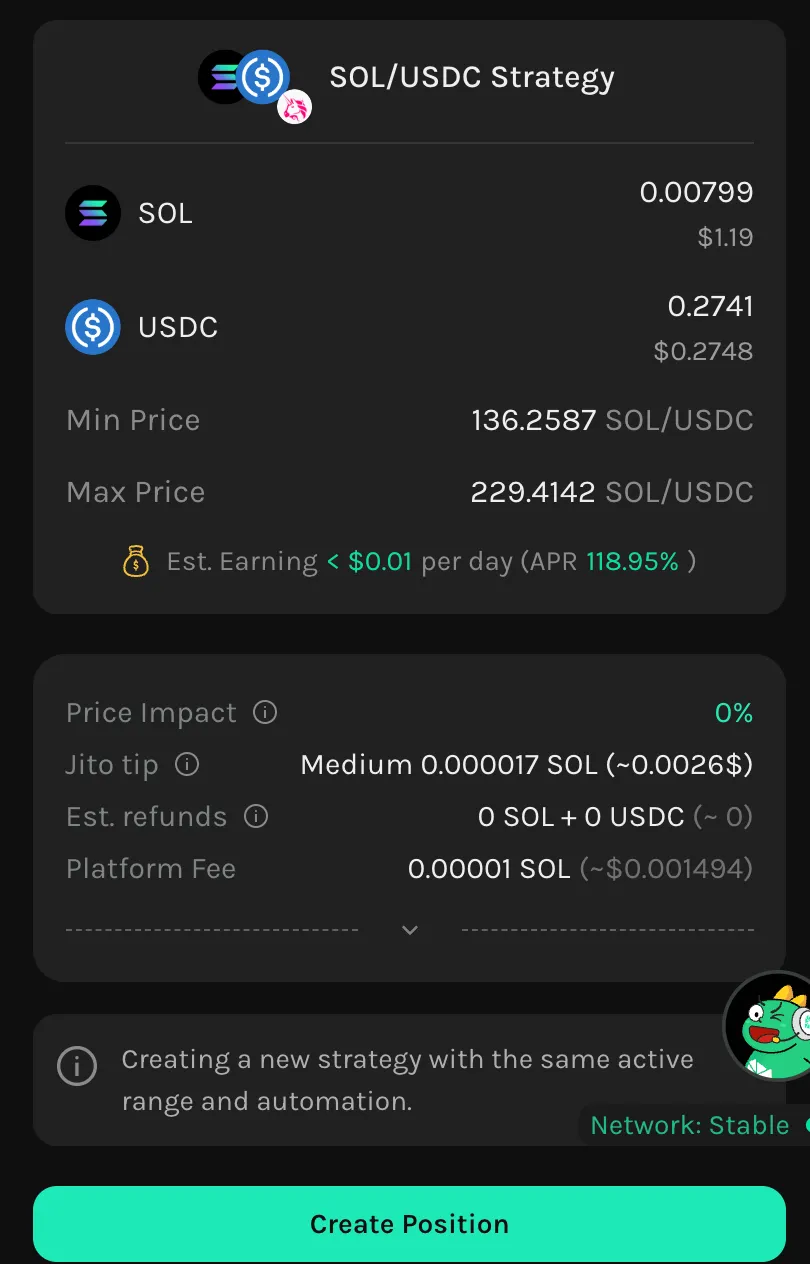
#### Step 5: Review order details before execution
Before executing the transaction, users should carefully review all key order details to ensure the best outcome.
Factors such as price impact, transaction fees, estimated earnings, and APR should be assessed to make decision.
Once all details have been reviewed and confirmed, users can proceed by clicking on "Create Position" to finalize the liquidity provision process.
---
# Agent Instructions
This documentation is published with GitBook. GitBook is the documentation platform designed so that both humans and AI agents can read, navigate, and reason over technical content effectively. Learn more at gitbook.com.
## Querying This Documentation
If you need additional information that is not directly available in this page, you can query the documentation by asking a question.
Perform an HTTP GET request on the following URL with the `ask` and `goal` query parameters:
```
GET https://docs.krystal.app/products/liquidity-management/how-to-find-lping-strategies-and-add-liquidity-on-solana-with-krystal.md?ask=&goal=
```
`ask` is the immediate question: it should be specific, self-contained, and written in natural language.
`goal` is what the user is ultimately trying to achieve, the reason they need the answer. Sharing it helps GitBook give you a better, more relevant answer. A goal is most helpful when it describes the outcome the user wants rather than restating the question. For example, with `ask=how do I create an API token`, a goal like `automate deployments from our CI pipeline` lets GitBook tailor the answer to that use case.
The response will contain a direct answer to the question and relevant excerpts and sources from the documentation.
Use this mechanism when the answer is not explicitly present in the current page, you need clarification or additional context, or you want to retrieve related documentation sections.