# Vault vs Strategy

You might be confused by all the different terms on Krystal:

* A **Liquidity Position** is a single position on a DEX (e.g., Uniswap V3), typically represented by an NFT issued by the protocol.
* A **Liquidity Strategy** is a managed approach to a specific trading pair, composed of one or a series of positions that are periodically rebalanced. Strategies could include automation tools like auto-rebalance, auto-exit, and fee compounding.
* A **Liquidity** **Vault** takes this further—it can hold **multiple Liquidity Strategies** across different pools and tokens. This allows users to build and share more **customized, advanced strategies** under a single, smart-contract-governed framework.

**Vault = Strategy + Automation + Community Sharing**

Vaults are not just a technical upgrade—they’re a shift in how liquidity farming is experienced on Krystal: **simpler, smarter, and scalable.**

### When to use a Vault?

Some of the Vault's benefits are listed at [What is A Liquidity Vault](/products/vaults/what-is-liquidity-vault.md#why-use-a-vault)

Technically Vault can cover whatever Strategy can, with improved management capabilities. However, Vault does have a different pricing model and a different list of supported chains, some might still be comfortable with Strategy.&#x20;

Following is a deeper comparison between Vault & Strategy

<table><thead><tr><th width="178.8660888671875">Feature / Aspects</th><th width="230.9781494140625">Strategy</th><th>Vault</th></tr></thead><tbody><tr><td>Holding Asset</td><td>LP Token</td><td>Vault Token</td></tr><tr><td>Accessibility</td><td>Self-managed with Zap and Automation tools</td><td><strong>Participants</strong>: Deposit, withdraw, earn.<br><strong>Vault Onwer</strong>: manages the fund with Zap and Automation tools.</td></tr><tr><td>Sharing</td><td>Copy strategies</td><td>Publish and monetize</td></tr><tr><td>Reward</td><td>LP fees<br>3rd-party farming rewards</td><td>LP fees<br>Integrated farming rewards (.e.g Merkl)<br>Revenue sharing for Vault Owner</td></tr><tr><td>Risk Mitigation</td><td>Self-managed</td><td>Vault risk levels &#x26; rules enforced</td></tr><tr><td>Chain/Protocol Support</td><td>Wider chains and protocols support</td><td>To be expanded gradually </td></tr><tr><td>Fee model</td><td>Fixed Zap and Automation Fees</td><td>Performance fees from generated rewards</td></tr><tr><td>Best-fit for</td><td>Simple strategy with a few liquidity positions<br>Low management effort (little rebalance/reallocate) </td><td><p>Multiple complex LP strategies</p><p>High management effort, regularly reallocates funds between different LPs. <br></p></td></tr></tbody></table>

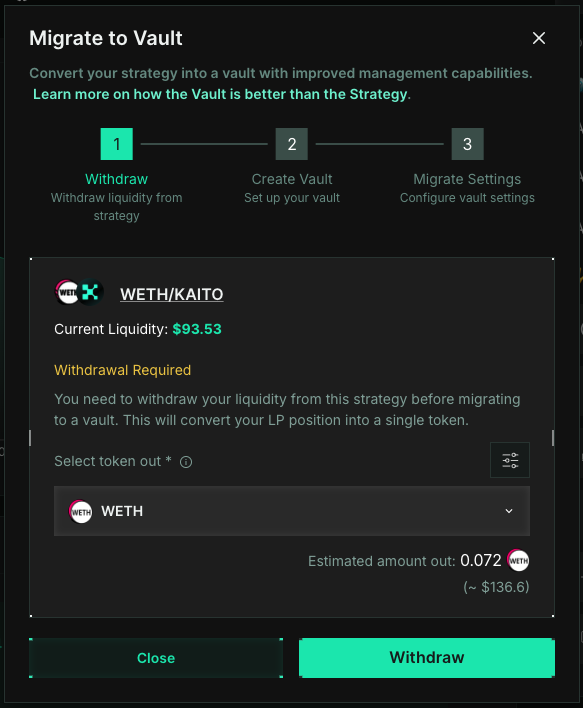
### Migrate from Strategy to Vault

To migrate, click the `Migrate to Vault` button on the strategy detail page, and follow the steps.

<figure><img src="/files/RTCaXohyDeDvOOMy6zzx" alt=""><figcaption></figcaption></figure>

<figure><img src="/files/q3FqQPDCxmTxjtAajTa8" alt="" width="437"><figcaption></figcaption></figure>


---

# Agent Instructions: Querying This Documentation

If you need additional information that is not directly available in this page, you can query the documentation dynamically by asking a question.

Perform an HTTP GET request on the current page URL with the `ask` query parameter:

```
GET https://docs.krystal.app/products/vaults/vault-vs-strategy.md?ask=<question>
```

The question should be specific, self-contained, and written in natural language.
The response will contain a direct answer to the question and relevant excerpts and sources from the documentation.

Use this mechanism when the answer is not explicitly present in the current page, you need clarification or additional context, or you want to retrieve related documentation sections.